Setting Up Your Profile Correctly
What you'll learn
- Claim or locate your existing Google Business Profile at business.google.com
- Configure your profile correctly — category, hours, description, service area — in about 30 minutes
- Hide your home address from public view if you're a home-based or telehealth practice
- Complete video verification without panic
- Understand why your verification address — not your service area list — determines where Google actually ranks you
Too busy to read? View the 90-Second Version
Your Google Business Profile powers the Local Map Pack — where 28% of your clients find you. Getting it right is critical.
- Claim and verify — If you haven't done this, nothing else matters.
- Avoid the 6 suspension triggers — P.O. Boxes, keyword-stuffed practice names, fake addresses, and virtual offices all risk suspension.
- Map your proximity circle — Google ranks you strongest near your verification address. The circle expands and contracts with competition, and a strong profile can partially override it — but never completely.
- Complete every field — Hours, services, insurance, description. Empty fields tell Google you're not a serious listing.
This is the single highest-ROI action you can take. It costs $0 and the setup takes about 30 minutes — less than a therapy intake form.
The Things That Get Profiles Suspended
Before we set anything up, let's kill the biggest fear: getting suspended.
When I first started looking into SEO, the internet was full of horror stories about Google suspending business profiles. It made me terrified to touch anything. But when you look closer, most of those suspensions come from people who listed their business name as "Best AuDHD Therapist St. Louis MO — Accepting New Clients." Don't do that. Use your legal name. The end.
Here's what actually triggers suspensions:
Keyword-stuffing your business name
Your profile name must match your real-world business name. If your LLC is "The Therapy Spot" — use "The Therapy Spot." If you're solo with no DBA or entity — use your name as you're professionally known. Google permits a title or degree certification in a practitioner's name (its examples are Dr., MD, JD, Esq., CFA); a credential like LPC is generally accepted, but if in doubt use just your name. What's not fine: "Liz Wooten — Neurodivergent Specialist" or "Best AuDHD Therapist St. Louis." Specialties, cities, and marketing language go in your description, your services section, and your categories — never the name field. Google cracked down hard on keyword-stuffed names in 2025-2026. Thousands of profiles were removed.
Using a virtual office, PO Box, or UPS Store address
Google requires a real physical location where you can receive mail and, for verification, record a video. Google has run repeated suspension sweeps against virtual-office addresses — entire buildings' worth of listings vanishing at once. If you work from home, use your home address — you can hide it from the public. More on that in a moment.
Creating duplicate listings
One practice = one profile. If you moved offices and created a new listing without deleting the old one, that's a duplicate. Merge or delete the old one before proceeding.
NAP mismatch — mainly between your own website and your profile
NAP stands for Name, Address, Phone — the basic identity of your business across the internet. Here's the nuance most guides get wrong: scattered inconsistencies across third-party sites (your GBP says "Liz Wooten," Psychology Today says "Elizabeth Wooten Therapy," your NPI says "E. Wooten, LPC") mostly hurt your ranking and trust — on their own they're not a reliable cause of suspension. And Google normalizes common abbreviations, so "Suite 100" versus "Ste 100" or "Street" versus "St." won't hurt you. The version that can actually contribute to a suspension is when the name, address, or phone on your own website doesn't match your Google profile. So fix that pair first — keep your website and your GBP identical — then tidy up the other directories over time to help your ranking.
Rapid batch edits
If you open your profile and change your name, address, hours, categories, and description all in one sitting, Google's spam detection system interprets that as suspicious activity. Make one or two changes. Wait a few days. Make the next batch. Spreading edits across a week looks like a real person maintaining their listing.
Account-level contagion
If the Google account you use to manage your GBP has violations on other Google products — suspended Google Ads campaigns, flagged Maps contributions, policy strikes — those violations can cascade to your business profile. Use a clean Google account dedicated to your practice.
Those are the real triggers. Don't do them and you won't get suspended. Everything else on your profile is editable, changeable, and reversible at any time.
The 30-Minute Setup
Open business.google.com on one screen. Keep this lesson open on the other. We're going step by step.
Find or create your listing (2 min)
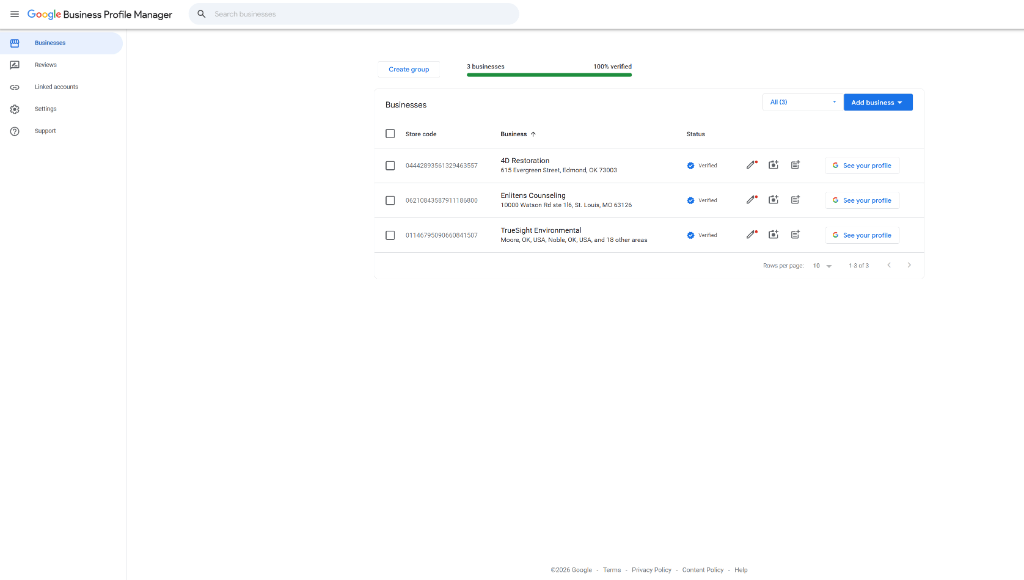
Go to business.google.com and search for your practice name. Google may already have a listing auto-generated from directory data, your NPI number, or a previous owner. You'll see a search bar at the top of the page asking for your business name. Type it in. If a listing appears in the dropdown, click it — you're claiming an existing profile. If nothing appears, click "Add your business" to create one from scratch.
Enter your business name (1 min)
You'll see a single text field labeled "Business name." Enter your legal business name exactly as it appears on your signage, your website, your Psychology Today listing, and your state licensing board registration. If you have an LLC or DBA — use that entity name. If you're a solo practitioner without a business entity — use your name (a credential like "LPC" is allowed on practitioner profiles). No specialties. No locations. No taglines. Just the name.
Choose your primary category (5 min)
This is the single most important field on your entire profile. More important than your description, your photos, your reviews. Google shows you a search-style dropdown — start typing your licensure type. There are nearly 4,000 categories in Google's system, most of which are wrong for you.
If you're an LPC, search "Counselor." LMFT — search "Marriage & Family Therapist." Psychologist — search "Psychologist." Pick the most specific match to what your license actually says. You can change this at any time.
Your primary category is the single strongest signal Google uses to decide which searches your profile is relevant for. A 'Counselor' profile will rank better for 'counselor near me' than a profile categorized as 'Mental Health Service' — even if everything else is identical.
Add 2-3 secondary categories (2 min)
These reflect your other specialties — "Play Therapist," "Family Counselor," "Mental Health Clinic." Keep it to 2-3. Adding 6 or 7 secondary categories dilutes the ranking weight of your primary category. Think of it like a résumé: listing three strong skills is more compelling than listing twelve mediocre ones.
Choose your location type (1 min)
Google will ask: "Do you want to add a location customers can visit?" You'll see two radio buttons. If clients physically come to your office — select "Yes." If you work from home or do telehealth only — select "No." Selecting "No" makes you a Service-Area Business (SAB). Your home address is used internally for verification and ranking, but it is never displayed publicly on your profile. Nobody can see it.
Set your service area (2 min)
You'll see a text field where you can enter cities, counties, or metro areas where you see clients or are licensed for telehealth. Type them in one at a time — Google will auto-suggest matches. This tells Google which geographic searches your profile is eligible to appear in. But read "The Invisible Circle" below — because eligibility and actual ranking are two different things.
Set your hours accurately (2 min)
You'll see a grid — each day of the week with start and end times. This matters far more than most people realize. Read "The Openness Signal" section below before you skip this.
Write your business description (10 min)
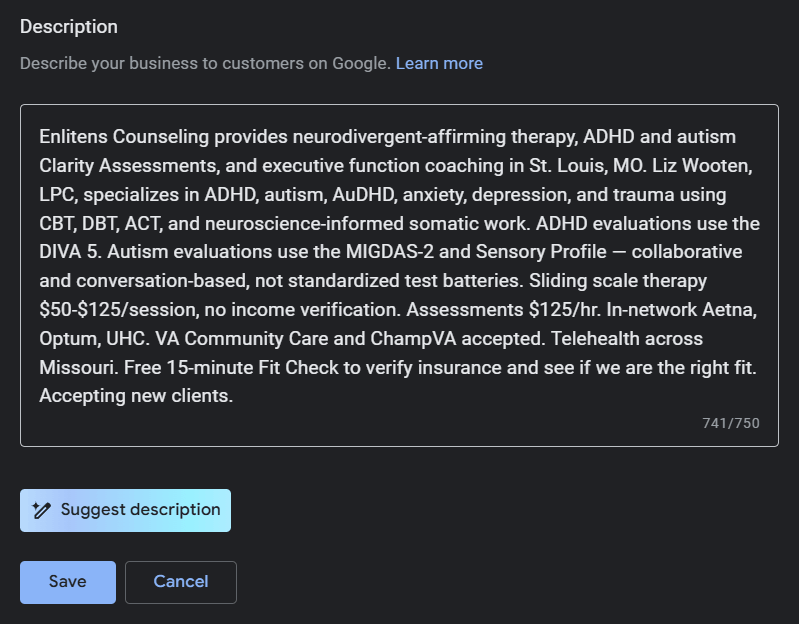
You get 750 characters. The first 250 characters appear before the "Read more" link — that's the only part most searchers will see. Lead with what you do and who you help. Not your credentials. Not your theoretical orientation.
Fill in insurance and language fields (2 min)
These are healthcare-specific fields (note: insurers can only be chosen from Google's preset list). List every insurance panel you're on. List every language you practice in. These fields feed directly into Google's automated systems, making it easier for clients searching for specific insurance coverage to find you.
Add your booking link (1 min)
If you use SimplePractice, Jane App, Calendly, or any scheduling tool — find the field labeled "Appointment links" and paste the direct booking URL. Not your homepage. The direct scheduling page. This creates a "Book Online" button that takes people straight to your calendar.
Total: approximately 30 minutes. Less than a therapy intake form. And every field you just filled out is editable — you can come back and change anything at any time.
The Openness Signal
Your hours are not just information for clients. They're a ranking signal.
Google checks whether a business is open at the moment of the search, and for many searches it demotes listings that appear closed. If your hours are missing, incorrect, or say you're closed during peak search times (weekday evenings, Saturday mornings — when people most often search for therapists), you can slide far down the results at exactly the moments people are looking. You don't vanish from the map entirely — but you might as well be on page two.
If your profile says you're closed on Saturdays but you see Saturday clients — fix that right now. If your hours say "Not provided" — fix that right now. If you changed your schedule six months ago and forgot to update your profile — fix that right now. This is a 2-minute fix that can immediately restore visibility you didn't know you'd lost.
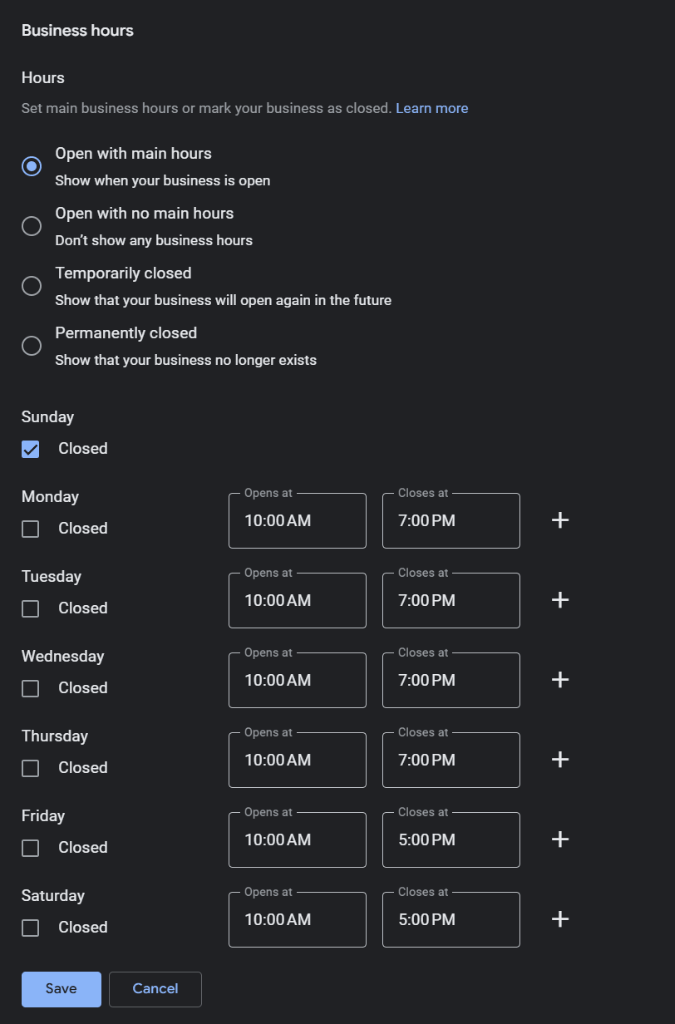
Openness is a real ranking factor. If someone searches 'therapist near me' at 7 PM and your profile says you close at 5, Google often demotes your listing for that search. Setting accurate extended hours — especially evenings and weekends — can immediately increase your visibility.
Video Verification (It's Not That Bad)
For years, Google verified your business by mailing a postcard with a 5-digit code. You had 30 days to enter it. I lost mine. I suspect you did too.
In 2026, the primary verification method is video. Here's what Google asks you to do — after you submit your profile information, Google will redirect you to a verification screen with a button labeled "Start recording." This opens your phone's camera within the Google interface. The video must be continuous and unedited.
I went through re-verification when I moved offices. The process was mildly annoying — like filling out forms at a new doctor's office. I recorded a walk through the new space with my phone, showed my license, and uploaded it. Approved in 48 hours. It's not the nightmare the internet makes it sound like. You can do this.
The Invisible Circle
This next part changes how you think about your listing.
Google ranks local businesses based on three factors: relevance, prominence, and proximity. Proximity is one of three major factors and is calculated from your verification address; for many searches it is decisive, but a strong, well-reviewed profile (prominence) and relevance can and do override distance.
That service area list you filled out in Step 6? Google uses it to determine which geographic searches your profile is eligible to appear in. But the actual ranking — whether you show up as #1 or #15 — is heavily weighted by the physical distance between your verification address and the person searching.
This isn't a fixed radius. In a dense urban market with dozens of competing therapists — downtown Chicago, Manhattan, central LA — your effective ranking area might be a few blocks. In a suburb with three therapists in a 20-mile radius, your listing might rank strongly across the entire area. The "circle" expands and contracts based on competition density, search volume, and how many other relevant profiles exist nearby.
What stays consistent: the closer a searcher is to your address, the more likely you are to rank well. A therapist with a strong profile and good reviews can outrank a closer competitor — relevance and prominence can partially override proximity. But they can't override it completely.
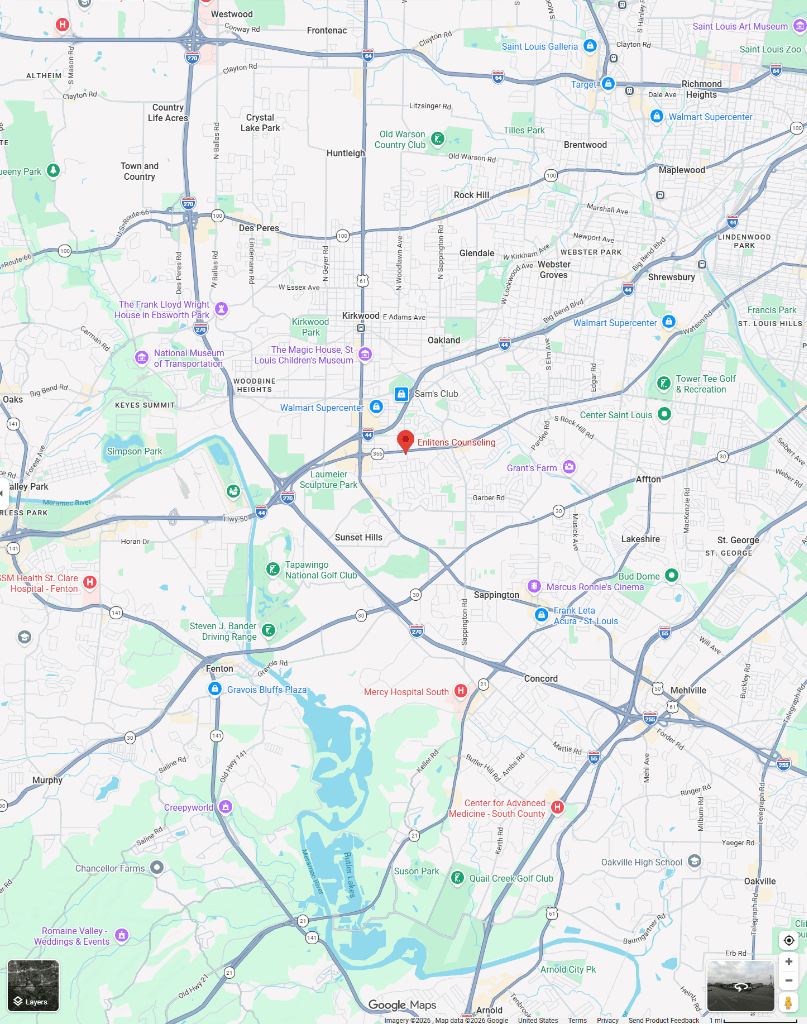
This is the most important concept in local SEO. A therapist with a perfect profile and 50 reviews can still be outranked by a mediocre profile that's 2 miles closer to the searcher. Proximity is one of the strongest signals. That's why your verification address matters so much.
Start your tracker now. Open a Google Doc or grab a piece of paper and write down: your GBP URL, your website URL, your PT profile URL, your domain registrar (and login), and the names of 5 referral sources you will contact in Module 5. Keep this in one place. You will reference it throughout the course and for years after.
No jargon left behind. You are not supposed to know these terms yet. Here is the plain-English decoder for every piece of digital vocabulary used in this lesson, along with its real impact on your practice.
- Google Business Profile (GBP)
-
Your practice's free, official profile on Google Maps that displays your phone number, hours, location, and client review dashboard.
SEO Practice Insight:GBP optimization is the highest-ROI, lowest-effort local ranking factor for independent private practices.
- NAP (Name, Address, Phone)
-
The crucial business directory information (Name, Address, Phone number) that must match identically across every profile on the internet.
SEO Practice Insight:Minor variations (like writing "Suite 102" on your website but "Ste 102" on GBP) confuse search crawlers and lower your local prominence ranking.
- Service-Area Business (SAB)
-
A Google Business configuration for telehealth-only or home-based therapists that lets you define a service radius while keeping your home address hidden.
SEO Practice Insight:Configuring your practice as an SAB ensures legal and personal safety compliance while still securing local Map Pack visibility.
- Local Proximity
-
How physically close your registered business address is to the exact coordinate of the user who is typing a search on their phone.
SEO Practice Insight:Google prioritizes proximity heavily. You cannot rank across an entire state in Map Packs from a single physical location, which is why hyper-local optimization is critical.
Key takeaways
- GBP setup takes 30 minutes. It's a form. You fill it out. Nothing is permanent — every field is editable at any time.
- No keywords in your business name. "Liz Wooten" or "Liz Wooten, LPC" — never "Liz Wooten — Anxiety Specialist St. Louis." Specialties and cities go in your description and services.
- Your primary category is the most important field. Pick the one that matches your licensure. Change it if you got it wrong.
- Fix your hours right now. Wrong or missing hours can push you far down the results exactly when people are looking for help.
- Video verification is annoying, not scary. Show your space, show your license, upload it.
- Google ranks you based on proximity to the searcher, weighted from your verification address. Your service area list determines eligibility. Your address determines ranking.