Posts, Updates, and Photos
What you'll learn
- Explain why an active profile matters — to Google and to clients — and what happens when you go quiet
- Write a GBP post in 5-10 minutes using a sustainable, minimum-viable cadence
- Upload photos that Google's algorithm actually values — and understand why stock images hurt you
- Know which photo habits actually matter — and which "renaming tactics" don't move rankings
- Read your GBP Performance tab and know which numbers matter
- Maintain your entire profile in approximately 1 hour per month
Too busy to read? View the 90-Second Version
Google's image recognition reads the text in your office photos. What you upload and post directly affects how Google categorizes your practice.
- Photos — Upload clear, well-lit images of your office. Google's AI scans them for context clues about your practice.
- 4 post types that work — availability updates, seasonal mental health guidance, service descriptions, and practice news.
- Consistency beats volume — Two posts a month keeps your profile visibly alive; one a week is even better if you have it in you. The signal is activity, not quantity.
Most therapists set up their GBP and forget it. The ones who post consistently get prioritized in the Map Pack over those who don't.
This Is Not Social Media
Let's get this out of the way: posting on Google is not like posting on Instagram. Nobody is scrolling their Google feed looking for your hot take on attachment theory. Nobody "follows" you on Google Business Profile. There is no feed. There is no audience.
A GBP post is more like flipping the "OPEN" sign on your door. You're not creating content for people to read and engage with. You're telling an algorithm: "I'm still here. My practice is active. I'm open for business."
That's it. That's what posting does. If that sounds underwhelming, good. It means the bar is far lower than you thought.
What Happens When You Stop Posting
Let's be honest about the evidence first, because that's the deal with this course: Google has never confirmed that posts directly affect your ranking. What we can say is that an active profile signals a living practice — to Google's systems and to the human at 11:47 PM deciding whether to call you. Think of it like a retail storefront that hasn't changed its window display in a month. It's technically open, but it doesn't look open.
A profile with no activity in six months or more starts to look like a closed business. Not to people who search your name directly — your profile will still appear. But to someone scanning the competitive "therapist near me" results, a profile that looks abandoned is easy to skip. That's why the routine below is still worth the hour a month it takes.
I'll be honest — before I figured this out, my own GBP posting schedule was... inconsistent. I'd post for a few weeks, then forget for two months. When I looked at my Performance data, the correlation between posting gaps and visibility drops was uncomfortably clear. The fix isn't complicated. But it does need to be consistent.
What Makes a Good Post (With Examples)
Don't overthink this. A GBP post is 2-4 short sentences (well under the 1,500-character cap; the first ~100 characters are what shows before the more link). Here are four types that work, with specific examples you can adapt:
Availability update
"Now accepting new clients for evening telehealth sessions — Tuesdays and Thursdays after 5pm. If evenings work better for your schedule, reach out through the booking link on this page."
Tells Google you're active AND tells potential clients something immediately useful.Seasonal mental health guidance
"The stretch between January and March is when I see the most new clients reach out about neurodivergent burnout. If shorter days are hitting harder than usual this year — that's a real thing, not a character flaw."
Shows topical relevance tied to your clinical expertise.Service description
"What happens in a first therapy session? It usually follows three acts. Act 1: The logistics and making sure you feel safe. Act 2: Assessment — we talk about what brought you in. Act 3: We decide together if we're a good fit. No pressure."
Demystifies a specific service while demonstrating expertise.Practice news
"Starting March 1, I'll have Saturday morning hours available — 9am to noon. If weekdays don't work for your schedule, this might."
Simple, useful, and signals activity.What NOT to post: Anything that identifies or references specific clients (obvious HIPAA line). Clinical content so detailed it could be mistaken for treatment advice. Anything that reads like a sales pitch — "Book now! Limited slots available!" is the language of someone selling concert tickets, not providing clinical care.
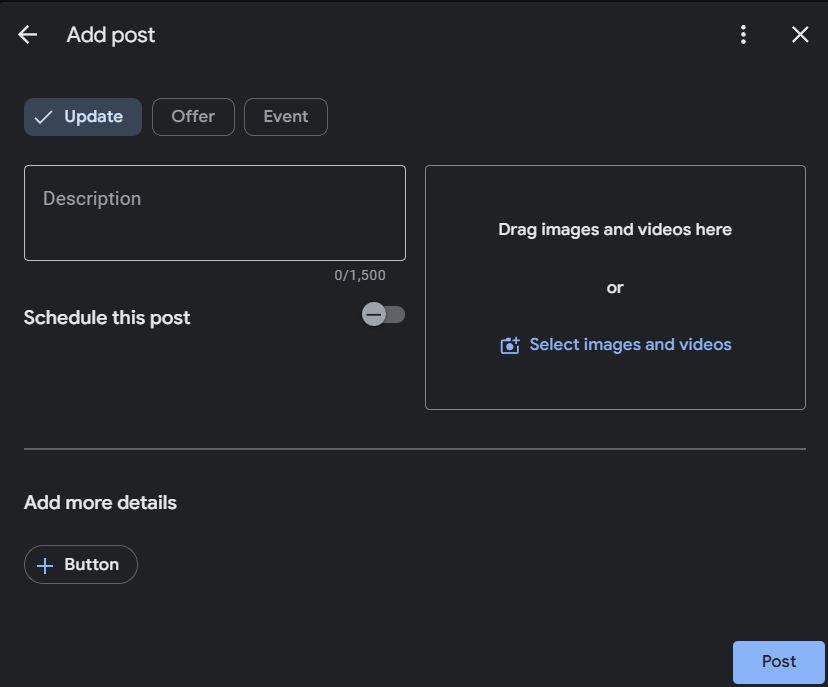
Google hasn't confirmed posts as a ranking factor — but an active profile signals a living practice to both Google and the clients reading it. Two short posts a month keeps yours looking open for business. You don't need to be a content creator — a 2-sentence availability update counts.
Google's Computer Eye
This is the part most people don't know — and it changes how you think about photos entirely.
Google doesn't just display your photos. It reads them. Google uses image-recognition (computer vision) to understand your photos — it can read text and identify what's in them.
It detects stock photos
Google compares your uploaded images against its global database. That river-with-smooth-stones photo? Google has seen it on thousands of other business profiles. Stock photos don't hurt your ranking directly — they just provide zero positive signal. They're wasted space.
It reads text in your photos
Google's OCR extracts text directly from the pixels. Your diploma on the wall. Your nameplate on the office door. Business cards on the desk. These are trust signals that tell Google: this is a real, specific, identifiable practice.
It validates physical presence
Original, high-resolution smartphone photos with visible real-world elements signal authenticity. Unique photos that don't exist anywhere else on the internet are the strongest signal.
What to upload (in order of impact)
- A professional headshot where you look like a real person (not a glamour shot, not a corporate headshot with a fake background)
- Your office exterior — the building, the entrance, any signage
- Your waiting room and therapy space — reduces arrival anxiety for new clients
- Close-ups of professional materials — your license on the wall, diplomas, nameplate
The 1-Hour Monthly Routine
Here's the month laid out. Total time commitment: approximately 1 hour, split across four weeks.
Week 1 (~15 min)
- Take 1 new photo of your office or professional space. Upload it to your GBP.
- Write 1 post — an availability update or a service description. Publish it.
Week 2 (~15 min)
- Take 1 new photo. Upload it.
- Write 1 post — a seasonal mental health tip or practice news. Publish it.
Week 3 (~15 min)
- Check for and respond to any new reviews. (The next lesson gives you the exact templates.)
- Verify your hours are still accurate. If anything changed — update it now.
Week 4 (~15 min)
- Open your GBP Performance tab and check the three numbers that matter.
How people find your listing: In your GBP dashboard, click "Performance" in the top navigation. Google breaks discovery into search queries that led to your profile. You can see whether people searched your name directly or found you through category searches like "therapist near me." For most starting out, category searches will be larger. That's good — people who didn't know your name are finding you.
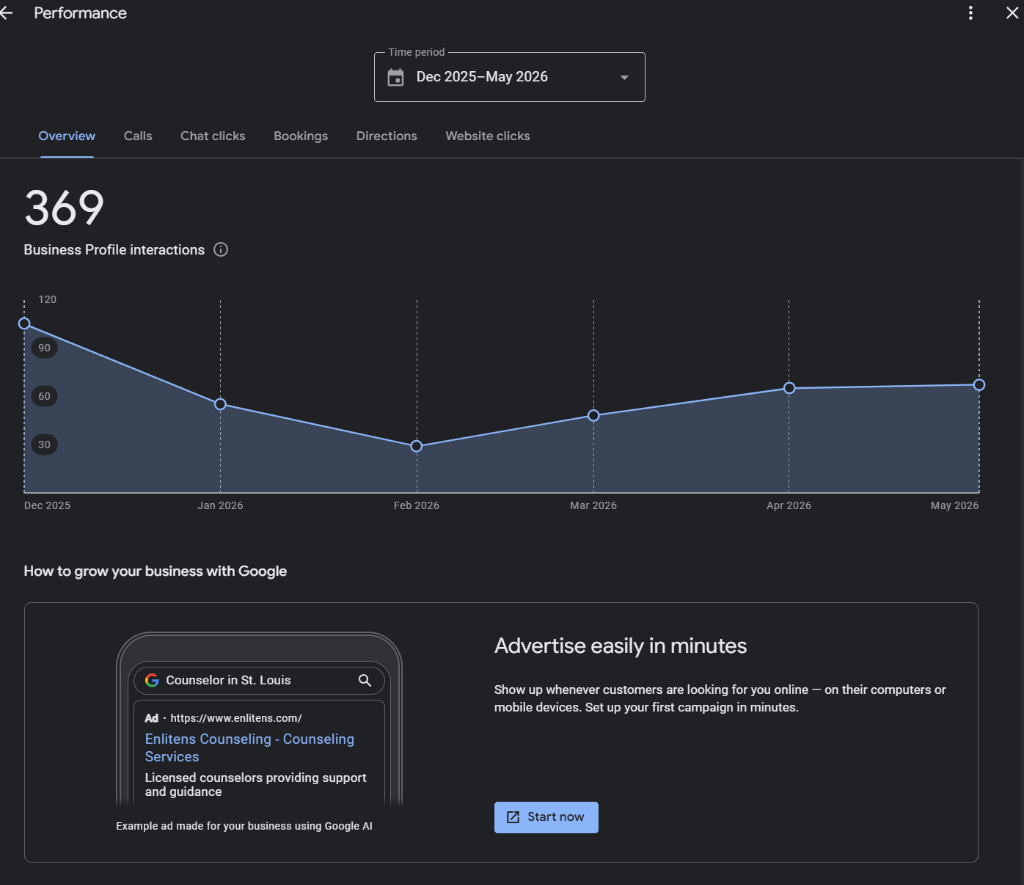
If you see queries that match services you offer but haven't mentioned in your description — add them. This is Google literally telling you what your potential clients are searching for.
What people do after finding you: The Performance tab tracks website clicks, direction requests, phone calls, and booking actions. Direction requests + website clicks combined is your actual conversion funnel.
Search queries: Scroll down in the Performance tab to see the actual words people typed to find your listing. This is gold. If you see queries that match services you offer but haven't mentioned — add them to your description.
Don't obsess over specific numbers. There's no universal benchmark. What matters is the trend. Are discovery searches increasing month over month? Are direction requests going up? If both are trending up, what you're doing is working.
Note: Google renamed this from "Insights" to "Performance" in 2023. If you see older guides referencing an "Insights dashboard," they're talking about the same data — it's just in a different place now.
The Psychology Today comparison: PT charges $30/month for a directory listing where you compete side-by-side with every other therapist who also pays $30/month. The profile is on PT's domain — not yours. And as Google's AI Overviews answer more therapy questions directly, directory pages like PT's have less search traffic to capture — we can't see PT's numbers from the outside, but the structural pressure is real.
Your Google Business Profile costs $0. It takes less total monthly time than writing a PT profile update. And for many solo practices, it delivers more visibility because it appears at the very top of Google results. This isn't an argument to cancel PT (it still has value as a referral source). It's context for where your time is best invested.
No jargon left behind. You are not supposed to know these terms yet. Here is the plain-English decoder for every piece of digital vocabulary used in this lesson, along with its real impact on your practice.
- EXIF Metadata (Photo GPS Data)
-
Hidden technical information automatically saved inside every smartphone photo, documenting the camera type, date, and exact GPS coordinates.
SEO Practice Insight:Real photos of your actual office beat stock photos for trust and engagement — that is the real win. Don't sweat the GPS data: Google strips EXIF location data on upload, and it is not a ranking signal.
- Alt Text (Alternative Image Text)
-
A short, descriptive, invisible label attached to a website image that describes what it shows, helping screen readers and search scanners parse the image.
SEO Practice Insight:Alt text should describe the image naturally for accessibility while weaving in location and specialty keywords (e.g., "Denver ADHD therapy office waiting area").
Key takeaways
- Activity is a signal, not a content strategy. Google hasn't confirmed posts move rankings — but an active profile looks like a living practice to Google and to clients. 2 posts per month keeps yours alive.
- Use original photos, not stock images. Google's image recognition reads your photos. Diplomas, nameplates, and real office shots are trust signals.
- What's in the photo matters more than the filename. Renaming files is a tidy habit, not a ranking tactic — a real office photo beats a perfectly named stock image every time.
- Check your Performance tab monthly. Discovery searches and direction requests tell you whether your profile is working.
- 1 hour per month maintains everything. 4 weeks × 15 minutes. Less time and less money than Psychology Today.