Stop Paying for 20-Page Digital Brochures: Escape the WordPress Agency Maintenance Retainer Scam
What you'll learn
- Identify and dismantle the WordPress "maintenance retainer" scam charging therapists $150–$500/month.
- Define the 5-page minimalist website architecture (Home, About, Services, Specialty Spoke, Contact).
- Understand how bloated menus and text walls trigger flight-or-flight in distressed searchers.
- Choose between Squarespace and WordPress objectively based on technical comfort.
- Execute the "Simplification Cleanse" on your existing or planned website map.
Too busy to read? View the 90-Second Version
You do not need a 20-page website. And you definitely do not need to pay $200/month for a WordPress maintenance retainer.
- 5 pages is enough — Home, About, Services, a Specialty Spoke, and Contact. That's it.
- Platform matters — Managed platforms (Squarespace, Wix) handle security and updates for you. WordPress requires constant maintenance or an agency retainer.
- The retainer trap — Many agencies build on WordPress specifically so you need them for $150-$500/month in "maintenance." That is the business model.
A simple, clean, 5-page site on a managed platform protects your clients' privacy and costs you around $16-25/month total — not $200+.
The $5,000 Academic Dissertation
When I first started planning my private practice website, I sat down with a legal pad and a stack of clinical textbooks. I was convinced that in order to be taken seriously, my website had to be a comprehensive encyclopedia of mental health. I mapped out a 20-page menu tree: dedicated pages for CBT, DBT, EMDR, Somatic Experiencing, developmental trauma, attachment theory, and an exhaustive blog. I spent weeks drafting dense, hyper-formal paragraphs that read exactly like a clinical intake report or an academic journal submission.
I thought this was how you built authority. I thought that if I didn't list every letters-after-my-name credential and explain the neurological pathways of trauma in exhaustive detail, potential clients would assume I was a fraud and my former professors would look down on me.
It was an exhausting, anxiety-fueled mistake.
Your website is not an academic dissertation designed to prove your worth to your former professors — it is a quiet, cozy room where a dysregulated human can safely take off their mask.
When a potential client lands on your website, they are not a clinical supervisor grading your theoretical orientation. They are usually sitting on their bathroom floor or in their car during a lunch break, crying, searching their phone for immediate relief. Their prefrontal cortex — the part of the brain responsible for decoding complex clinical jargon — is effectively offline.
If you force them to solve a cognitive Rubik's cube just to find out if you treat their specific pain, you have failed the first test of clinical empathy. They will not read your academic papers. They will hit the back button and find a therapist whose digital office feels safe, clean, and immediately understandable.
We are going to dismantle the complex, bloated website model entirely. You do not need a massive digital brochure. You need a highly focused, highly protective 5-page minimalist digital office.
Exposing the WordPress "Maintenance Retainer" Scam
If you have ever talked to a digital marketing agency, you have likely been pitched a "custom WordPress website." They will tell you that WordPress is the only "professional" option for a serious business, that it is essential for SEO, and that it requires a mandatory monthly "hosting and maintenance" retainer of $150 to $500 to keep your site secure and functional.
This is one of the most pervasive, predatory grifts in the digital marketing industry, and it is specifically designed to exploit the technical anxiety of therapists.
Let me be incredibly clear here: paying a professional $300 to $500 a month to actively monitor and manage your SEO, write monthly blog content, and run your Google Business Profile is a completely valid business expense. That is active marketing.
But paying an agency $200 a month just to keep your website online and update your plugins is a scam.
What are they actually doing for that $200 a month? They are running automated scripts that click "Update" on a few plugins once a week — a task that takes less than five minutes and should be entirely automated.
And here is the dark comedy of the WordPress ecosystem: because it is a patchwork of third-party templates, custom code, and dozens of plugins (each written by a different developer), those updates frequently break each other.
You are a therapist, not a systems administrator. You should not be managing database servers, caching layers, and security certificates just to let a client know you have an opening at 3 PM on Tuesdays.
A modern website builder like Squarespace completely eliminates the middleman. For around $16–25 a month (depending on plan and billing), Squarespace handles your hosting, security, SSL certificate, and responsive mobile layouts natively, and keeps a version history of your pages so you can roll back mistakes. There are no plugins to update. Nothing to break. No white screens of death.
If you are paying a marketing agency a monthly retainer just to keep your basic site online — with no active SEO or content marketing attached — you are being scammed. We are going to reclaim your financial and technical autonomy.
The 5-Page Minimalist Practice
To reduce the cognitive load on your future clients and save yourself months of writing, we are limiting your digital office to exactly five pages. No more, no less. This acts as a firm clinical boundary, guiding a distressed reader down a predictable, calming pathway instead of scattering their attention across dozens of nested submenus.
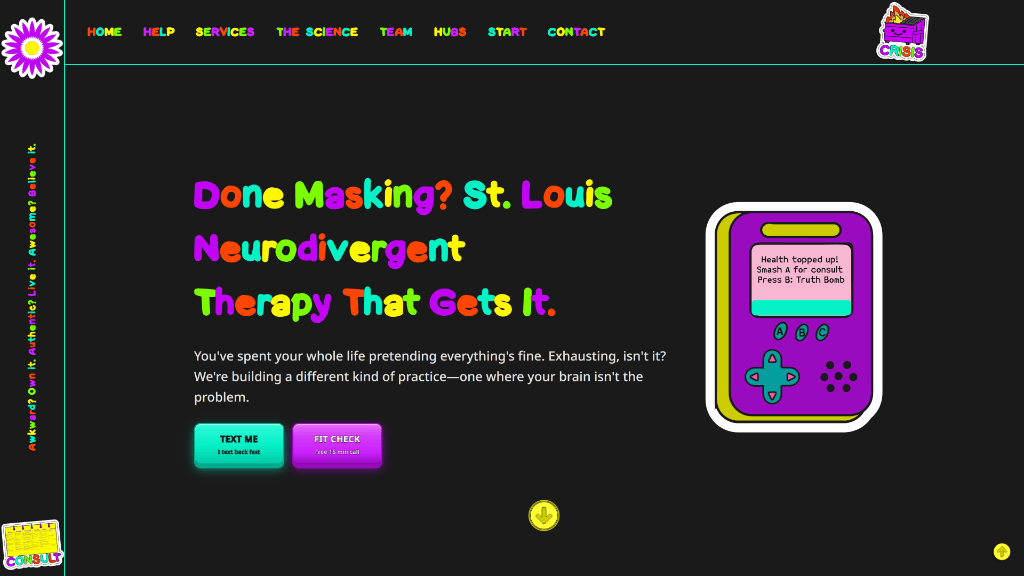
You don't need a custom-engineered masterpiece on day one to convert. A simple 5-page Squarespace site built on these same somatic principles — one strong hook, a clear face photo, and an obvious CTA button — will outperform a $5,000 corporate WordPress site every time.
Home Page
The Front DoorIts sole purpose is to co-regulate the visitor, signal that they are in the right place, and direct them to the appropriate services page. It features a bold, somatic-recognition headline, a clear photo of your face, and a single, obvious button to take the next step.
Services Page
The Waiting RoomInstead of a sterile list of DSM codes, this page is structured using the 6-Section Somatic Copy Template (which we will write in the next lesson). It speaks directly to the physical lived reality of your target archetypes.
About Page
The Therapist's ChairNot your professional CV. It is a human-to-human introduction using the Colleague & Referral Partner Strategy, building credibility with local physicians, school counselors, and peer therapists.
Specialty Spoke
The Clinical NicheOne highly specific, high-intent clinical specialty (e.g., Late-Diagnosed AuDHD Burnout). This is your high-performing search engine page. It proves you are the go-to specialist in your local region.
Contact Page
The Low-Friction TriageTransparent pricing, a clear statement on insurance, your HIPAA-secure contact form (this must be a third-party HIPAA tool such as Hushmail, Jotform HIPAA, or Paubox — Squarespace's built-in form is not HIPAA-compliant), and a professional mailing address — federal CAN-SPAM law requires it in your marketing emails, and putting the same address in your site footer keeps everything consistent. Zero friction.
By trimming your navigation to five pages, you slash cognitive load to zero. You replace the messy, chaotic noise of the internet with a clean, minimalist container that signals clinical safety from the very first click.
Squarespace vs. WordPress: The Brutal Comparison
Let's make an objective, realistic choice based on your actual technical comfort level. You do not need to be a coding genius to own your site, but you must know what you are signing up for.
| Feature | Squarespace ($16–25/mo) | WordPress ($5–15/mo hosting) |
|---|---|---|
| Setup | Fully integrated — hosting, SSL, forms, mobile in one dashboard | Must buy hosting, connect domain, install firewalls, set up backups separately |
| Maintenance | Zero — automatic updates, no plugins to break | Several hours/month — weekly plugin updates, security patches |
| Security | Native — no outdated plugins to exploit | Your responsibility — outdated plugins = hack risk |
| Flexibility | Drag-and-drop (rigid but prevents design disasters) | Unlimited — you own 100% of the code |
| Support | 24/7 email; live chat Mon–Fri | DIY — Google the error message |
| Best for | Most solo therapists | Technically curious + want full layout control |
For a solo practitioner, your time is your most valuable asset. Every hour you spend troubleshooting a plugin error or arguing with a web host is an hour you are not billing clients or resting. Unless you have a strong reason to choose WordPress, start with an entry-level Squarespace plan — around $16–25/month depending on plan and billing.
The "Simplification Cleanse" Micro-Action
We are going to execute an immediate audit of your existing website layout—or the layout you are currently planning. Take out a piece of paper and follow these three steps:
Your main menu should be a clean, silent line of text. No dropdowns. No nested links. When a visitor lands on your page, their eyes will rest easily on a simple, predictable path. You have just completed your first clinical act of co-regulation.
You have established a clean, minimalist structure for your digital office. But the rooms are empty. In the next lesson, we will write the words that sit inside them—translating your clinical brilliance into somatically recognized copy.
No jargon left behind. You are not supposed to know these terms yet. Here is the plain-English decoder for every piece of digital vocabulary used in this lesson, along with its real impact on your practice.
- CMS (Content Management System)
-
The editor dashboard software (like Squarespace, WordPress, or Webflow) that lets you update your website text and photos without writing code.
SEO Practice Insight:For solo therapists, Squarespace or native WordPress offers the optimal balance of design ease, SEO stability, and long-term cost efficiency.
- Website Hosting (Web Host)
-
Renting secure space on a physical server connected to the internet that stores your site's files and keeps your website turned on 24/7.
SEO Practice Insight:Do not pay agencies inflated "website maintenance" retainers for basic hosting. Standard hosting should cost between $3 and $25 per month (entry-level shared hosting is often under $10/month).
- Domain Registrar
-
The secure digital store (like Cloudflare, Porkbun, or Namecheap) where you officially purchase, register, and annually renew your domain address.
SEO Practice Insight:Always buy your domain yourself on your own credit card. Never allow a web agency to register your domain name on their account.
- DNS Records (A, CNAME, TXT)
-
The domain name system records—a digital address book that tells the internet where to find your website files, secure email server, and domain verification keys.
SEO Practice Insight:TXT records are critical for verifying your paid HIPAA Workspace email and ensuring your therapeutic intake notifications don't get routed to client spam.
- SSL Certificate (HTTPS)
-
A digital security layer that fully encrypts the connection between your website and a visitor's browser, displaying a padlock icon in the URL bar.
SEO Practice Insight:Google uses HTTPS as a lightweight ranking signal, but the bigger problem is the browser "Not Secure" warning, which scares off prospective clients before they read a word.
Key takeaways
- Your website is a digital office, not a dissertation. Speak to the nervous system of the client sitting on their bathroom floor, not the academic pride of your former professors.
- Dismantle the WordPress retainer trap. Avoid agencies charging $200/mo for simple plugin updates. An entry-level Squarespace plan handles security, hosting, and mobile responsive design natively.
- Lock your menu to exactly 5 pages. Home, About, Services, Specialty Spoke, and Contact. This reduces extraneous cognitive load.
- Choose Squarespace for simplicity. Solo practices thrive when technical overhead is zero.
- Execute the Simplification Cleanse. Ruthlessly prune bloated pages, merge FAQs, and clear your navigation menu to establish a safe clinical container.