Setting Up Your Profile Correctly
What you'll learn
- Claim or locate your existing Google Business Profile at business.google.com
- Configure your profile correctly — category, hours, description, service area
- Check whether your practice meets Google's in-person rule, and when your address can stay off your public profile
- Complete video verification without panic
- Understand why distance to the person searching — not your service area list — shapes where you show up
Too busy to read? View the 90-Second Version
Your Google Business Profile is how you show up on Google Search and Maps — if your practice qualifies for one.
- Check that you qualify, then claim and verify — Google only lists practices that meet clients in person. If you see clients only by video, read the telehealth box near the end first.
- Avoid the suspension triggers — P.O. Boxes, keyword-stuffed practice names and fake addresses all risk suspension, and Google says a virtual office isn't eligible for a profile.
- Know the three ranking factors — Google says local results are mainly based on relevance, distance and popularity. Distance is measured to the person searching; relevance and popularity are the two you can work on.
- Complete every field — Hours, services, insurance, description. Google says complete, accurate profiles are more likely to show up in local results.
If you meet clients in person, a profile is free to set up. If you see clients only by video, the lesson shows where to put your effort instead.
The Things That Get Profiles Suspended
Before we set anything up, let's kill the biggest fear: getting suspended.
When I first started looking into SEO, the internet was full of horror stories about Google suspending business profiles. It made me terrified to touch anything. But when you look closer, most of those suspensions come from people who listed their business name as "Best AuDHD Therapist St. Louis MO — Accepting New Clients." Google doesn't permit extra information in your business name, and it could get your profile suspended. Don't do that. Use your real name. The end.
Here's what actually triggers suspensions:
Keyword-stuffing your business name
Your profile name must match your real-world business name. If your LLC is "The Therapy Spot" — use "The Therapy Spot." If you're solo with no DBA (a registered trade name) or entity — use your name as you're professionally known. Google permits a title or degree certification in a practitioner's name (its examples are Dr., MD, JD, Esq., CFA); if in doubt, use just your name. What's not fine: "Liz Wooten — Neurodivergent Specialist" or "Best AuDHD Therapist St. Louis." Specialties, cities, and marketing language go in your description, your services section, and your categories — never the name field, because Google doesn't permit unnecessary information there.
Using a virtual office, PO Box, or UPS Store address
Google's test for a profile is meeting customers in person, either at a place they visit during your stated hours or by traveling to them. A mailing address you rent but don't work from (a virtual office, PO Box, or UPS Store box) fails that test, even though it takes your mail. If you work from home and clients come to you there, your home is a place customers visit. If you travel to clients from home, Google says to hide your address as a service-area business. More on that in a moment.
Duplicate listings (Google can hide one)
One practice = one profile. If you moved offices and a new listing now sits beside the old one, Google can treat one of them as a duplicate, and a duplicate won't show on Search or Maps. Don't delete the old one first: that permanently removes your posts, photos, videos, and review replies, while its reviews stay behind on a listing nobody manages. Screenshot both, then contact Google and ask them to transfer the reviews from the old profile to the new one, which is Google's own route when a move leaves you with two.
NAP mismatch — mainly between your own website and your profile
NAP stands for Name, Address, Phone — the basic identity of your business across the internet. The one rule worth keeping: keep your name, address and phone the same everywhere, starting with your own website and your Google profile, then tidy up the other directories over time.
Edits that can trigger re-verification
Google's help pages name three edits that can bring re-verification: a new address must, while a new business name or an added or edited category might. Other changes to your business info may, too. So change those fields only when something has really changed, and be ready to verify again.
Trouble on your Google account can reach your listing
If the Google account you use to manage your GBP has violations on other Google products — suspended Google Ads campaigns, flagged Maps contributions, policy strikes — those violations can cascade to your business profile. Use a clean Google account dedicated to your practice.
Those are the triggers you control. Avoiding them isn't a force field, though: if you don't meet clients in person, you can be refused no matter how clean your profile is. Some edits, like a new address, also send you back through verification. Know those two going in, and the rest is a form.
The 10-Step Setup
Open business.google.com on one screen. Keep this lesson open on the other. We're going step by step.
Find or create your listing
Go to business.google.com and search for your practice's name and city. Google may already have a listing it built from other websites or from data it licenses from other companies. If your listing shows up, select it — you're claiming an existing profile. You can also find it on the map and select it there. If nothing appears, click "Add your business" to create one from scratch.
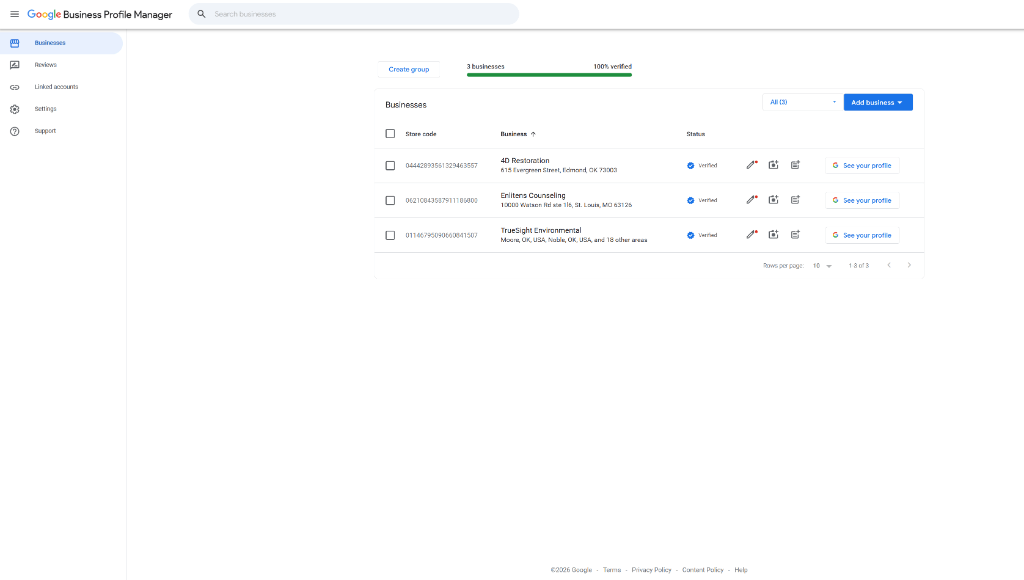
Enter your business name
You'll see a single text field labeled "Business name." Enter your business name exactly as it appears on your signage. Google asks for your real-world name: the one used on your storefront, your website and your stationery, and the one your clients know. If you have an LLC or DBA — use that entity name. If you're a solo practitioner without a business entity — use your name (Google lets a practitioner profile include a title or degree certification, like Dr. or MD). No specialties. No locations. No taglines. Just the name.
Choose your primary category
Google asks you to pick the primary category that best describes your business, from the list that shows up as you type — start typing your licensure type.
If you're an LPC, search "Counselor." LMFT — search "Marriage & Family Therapist." Psychologist — search "Psychologist." Pick the most specific match to what your license actually says. You can change it later, but Google's own category page says an edit might mean verifying your business again, so it's worth getting right the first time.
Add a few secondary categories
These reflect your other specialties — "Play Therapist," "Family Counselor," "Mental Health Clinic." Google lets you add up to 9 more, and its own advice is to use the fewest categories that describe your core business. Keep it short. Think of it like a résumé: listing three strong skills is more compelling than listing twelve mediocre ones.
Choose your location type
Google asks you to choose whether you have a location customers can visit. You'll see two radio buttons. If clients come to your office and it's staffed during business hours — select "Yes." Google's video check for that choice looks for your practice name on a permanent fixture there, like a signboard, wall, or window.
A home office clients really come to is a place customers visit too. Google's word for that is a storefront: in-person contact with customers during business hours, at a physical location with permanent on-site signage. Without a permanent sign, Google's video page says to list as a service-area business instead.
Select "No" if you don't have a storefront staffed during business hours — for example, you travel to clients for home visits. That makes you a Service-Area Business (SAB): you still verify your address, but it stays off your public profile. If clients come to you but there's no permanent sign, this is your choice too, as the paragraph above says. If you see clients only by video, neither answer fits Google's rules, so read the 100% telehealth box near the end of this lesson before you go further.
Set your service area
If you chose "Yes" in step 5 and don't travel to clients, skip this step. Otherwise, you'll see a text field where you can enter the cities, counties, or metro areas you serve. Google caps a service area at about 2 hours of driving time from where your business is based, so list the places you really serve, not everywhere your license covers. Type them in one at a time, and pick from Google's suggestions or enter your own.
Google says your service area shows customers where you work and helps people find your profile. How high you show up is a separate question, and "Distance to the Searcher" below covers it. (If an older guide tells you to "define your radius," it's out of date. Google says you can't set your service area as a radius around your business, and an old radius setup can't be edited.)
Set your hours accurately
You'll see a grid — each day of the week with start and end times. This matters far more than most people realize. Read "The Openness Signal" section below before you skip this.
Write your business description
You get 750 characters. Lead with what you do and who you help. Not your credentials. Not your theoretical orientation. And Google's policy keeps time-bound promotions, pricing and direct calls to action (like "Call today") out of the listing itself.
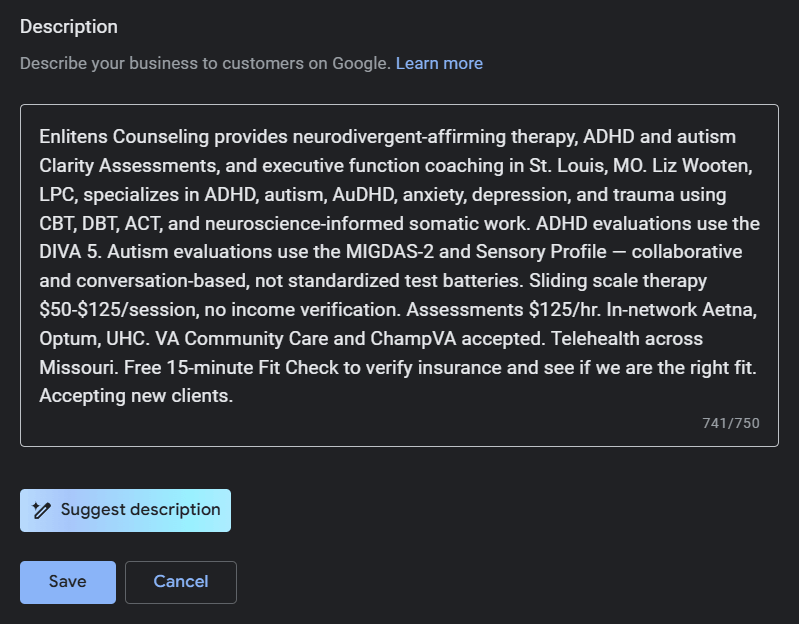
Fill in insurance and language fields
If your profile shows fields for the insurance you take or the languages you work in, fill them in.
Add your booking link
If you use SimplePractice, Jane App, Calendly, or any scheduling tool — add a link, choose the kind of booking it is for (an appointment), and paste the direct booking URL. Not your homepage. The direct scheduling page. Google calls this adding a booking link. People who find your profile go straight to your calendar from it.
That's the setup. And you can come back and edit any field later, though changing your name or address can mean verifying all over again, so those two are worth getting right today.
The Openness Signal
Your hours are not just information for clients.
In December 2023, Google's Search Liaison wrote that Google has long used "openness" as part of its local ranking systems, that it had recently become a stronger signal for searches that aren't for one specific business, and that this might change. So if your profile says you're closed at times people can actually reach you or book a consult, you can rank lower for those searches.
If your profile says you're closed on Saturdays but you see Saturday clients — fix that right now. If your hours say "Not provided" — fix that right now. If you changed your schedule six months ago and forgot to update your profile — fix that right now. Each fix can restore visibility you didn't know you'd lost.
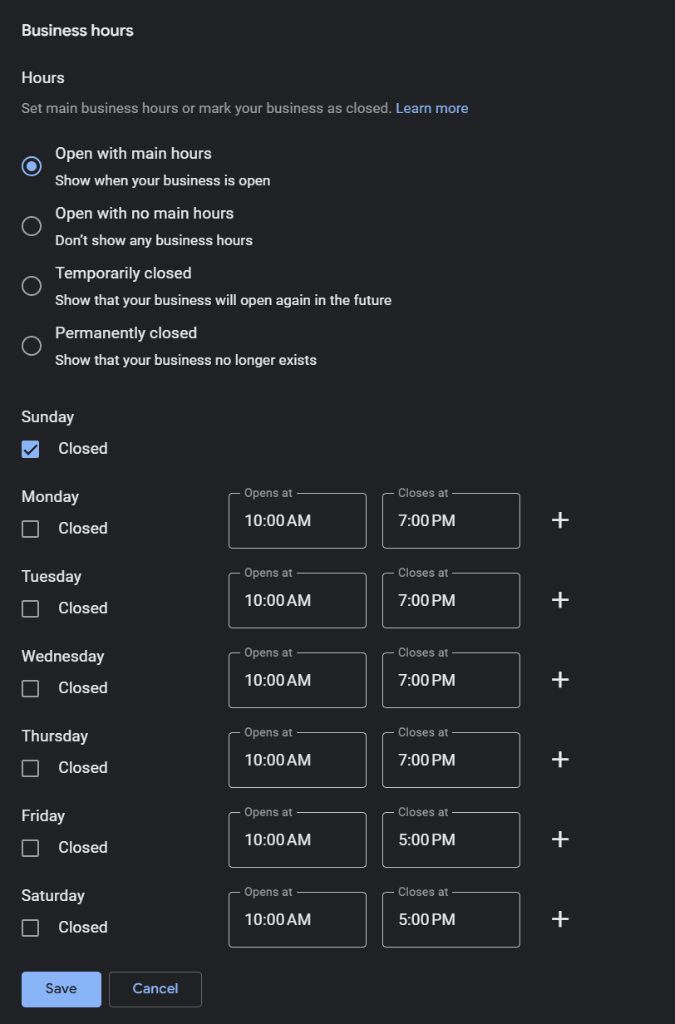
List the hours you hold appointments and answer your phone, the way a clinic lists its office hours. If you see clients in the evenings or on weekends, those are real hours, so list them.
Video Verification (It's Not That Bad)
Google can verify your business by mailing a postcard with a 5-digit code, and you have 30 days to enter it. I lost mine. I suspect you did too. Postcards still exist, but Google now picks which verification methods each business gets, and it recommends video wherever video is offered.
If video is on your list, here's what Google asks you to do — on the verification screen, tap to start recording. The video must be continuous and unedited.
I went through re-verification when I moved offices. The process was mildly annoying — like filling out forms at a new doctor's office. I recorded a walk through the new space with my phone, showed my license, and uploaded it. Approved in 48 hours. It's not the nightmare the internet makes it sound like. You can do this.
Distance to the Searcher
This next part changes how you think about your listing.
Google says local results are mainly based on relevance, distance and popularity. Distance is how far your business is from the person searching. Relevance and popularity are the two you can work on.
So put your effort into the two factors you can move: relevance (how well your profile matches the search) and popularity (how well-known you are). Your side of the distance is set by your address.
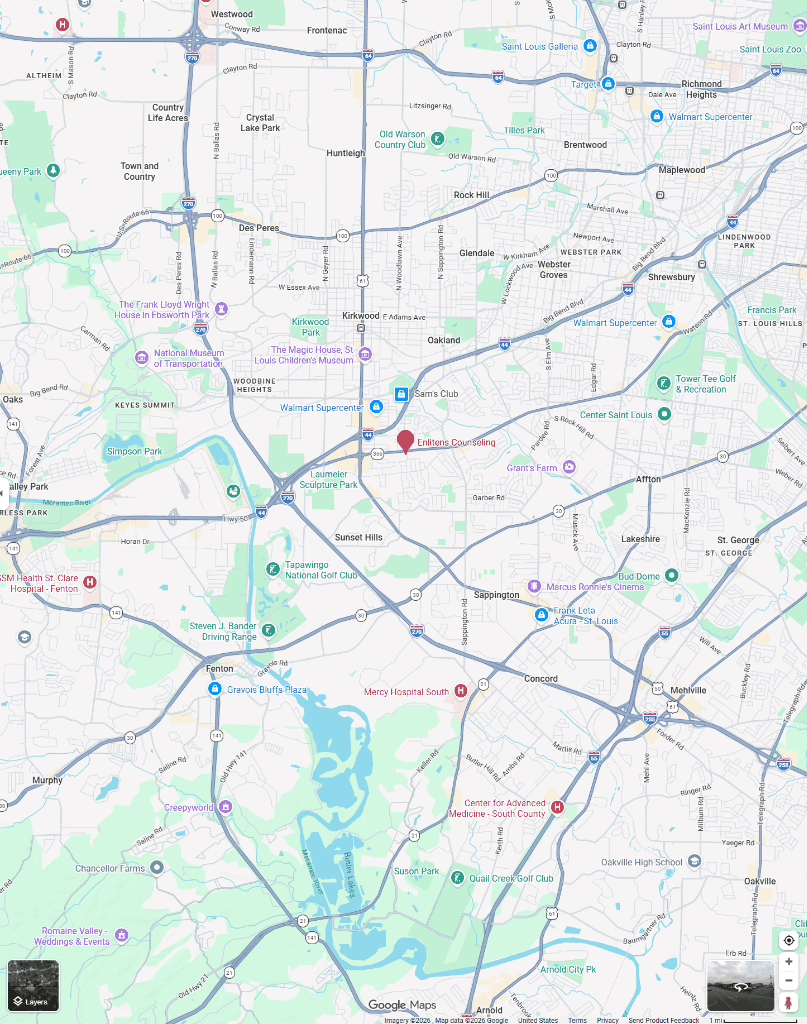
This is the most important concept in local SEO.
Start your tracker now. Open a Google Doc or grab a piece of paper and write down: the link to your Google listing (search your practice name on Google, open your listing, and copy the address from the browser bar), your website URL, your PT profile URL, the company you bought your web address from, and the names of 5 referral sources you will contact in Module 5. Keep this in one place. You will reference it throughout the course and for years after.
You are not supposed to know these terms yet. Here is the plain-English decoder, along with its real impact on your practice.
- Google Business Profile (GBP)
-
Your practice's free, official profile on Google Search and Maps, with basic information such as your phone number and hours. Google gives one only to a practice that meets clients in person during its stated hours; a practice that sees every client by video is not eligible and cannot be verified.
SEO Practice Insight:Your free Google listing is the best use of your time for showing up nearby.
- NAP (Name, Address, Phone)
-
Your practice name, address and phone number. Google asks you to show your business the way it is consistently shown and known in the real world.
SEO Practice Insight:Keep your name, address and phone the same everywhere.
- Service-Area Business (SAB)
-
A Google Business Profile setup for a business that visits or delivers to its customers instead of serving them at its own address, like a therapist who does home visits. The address stays off the public profile, which shows the areas you serve instead, within about 2 hours of driving time.
SEO Practice Insight:It isn't a telehealth setting. Google's rules require meeting customers in person. Google says a business customers can't visit, that doesn't visit them either, isn't eligible. A practice that sees every client by video is that business, with or without a service area.
- Local Proximity
-
How far your business is from the person who is searching.
SEO Practice Insight:Google names distance as one of the three things its local results mainly rest on, beside relevance and popularity. Distance is measured to the searcher, which is why the work has to be about your own neighborhood.
- NPI (National Provider Identifier)
-
Your provider number from the federal government. It must be used in all HIPAA standard transactions, which is why insurers and billing platforms ask for it.
SEO Practice Insight:Your NPI record is one of the places your practice name should read the same as on your Google listing and your website. If it shows the name differently, tidy it when you can (Lesson 2.1).
- DBA (Doing Business As)
-
A registered trade name for your practice that is not your own name.
SEO Practice Insight:Google asks that your listing name be your real-world business name: the one on your sign, your website and your paperwork, and the one clients know you by.
Key takeaways
- Google gives a profile only to businesses that make face-to-face contact with customers, and the profile is free. It's a form. You fill it out. You can update your details later, but a new name or address can mean verifying again.
- No keywords in your business name: Google asks for your real-world name and doesn't permit unnecessary information in it. "Liz Wooten" or "Liz Wooten, LPC" — never "Liz Wooten — Anxiety Specialist St. Louis." Specialties and cities go in your description and services.
- Pick the primary category that matches your licensure. If you got it wrong, change it, and plan on verifying again, since Google says a category edit might ask for that.
- Fix your hours right now: list the hours you hold appointments and answer your phone. Google's Search Liaison said in December 2023 that openness had become a stronger local signal for searches that aren't for one specific business. A profile shown closed can rank lower in those.
- Video verification is annoying, not scary. Show your space, show your license, upload it.
- Google says local results are mainly based on relevance, distance and popularity. Distance is measured to the person searching; your service area list says where you serve, not where you rank.